
The FrogBox battery expansion pack is a portable power bank you can use to replace the existing V1 portable battery. It features an OLED smart display, USB-C charging and is suitable to use with the V1 FrogBox kits, as well as mobile phones, tablets, laptops and other portable devices for fast charging.
What's in the Battery Expansion Pack for V1 Camera Kits?
- 2 x Power Banks
- 2 x 1m USB-C to USB-C cable to charge the power banks
- 1 x 1.5m DC to DC cable to power the video viewer
Charging the battery expansion pack
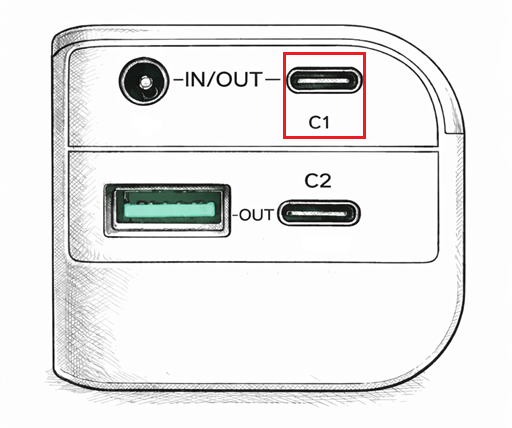
Step 1: Plug the provided USB-C cable into the C1 Port of the power bank (see figure below) and connect the other end to a power source.
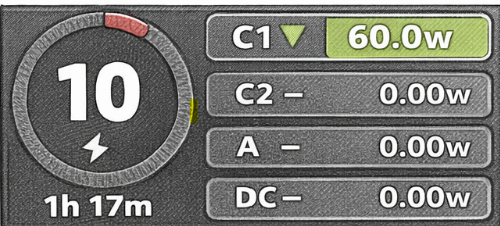
Step 2: Following connecting to a power source the screen on the battery pack will display as shown in the figure below. The green background of 'C1' will be lit up, and the charging power will be displayed, along with time remaining for a full charge.
Using the battery expansion pack with the V1 kit
Powering the V1 Panasonic camera
Step 1: Turn on the 1st power bank.
Step 2: Plug your existing v1 USB camera charging cable into the USB-A Port on the 1st power bank and plug the other end into the camera cord coming out from the camera
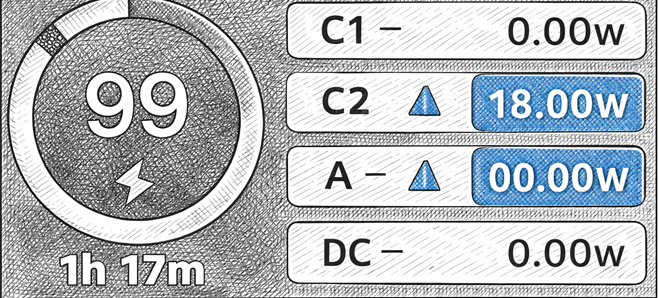
Step 3: Following connection, the blue background of the C2 display on the power bank will automatically light up and will display the discharge power, battery percentage and the remaining working time (see image below).
Powering the V1 encoder
Step 1: Turn on the 2nd power bank.
Step 2: Plug your existing v1 USB charging cable into the the C2 Port of the 2nd power bank and plug the other end into the encoder.
Step 4: Following connection, the blue background of the C2 display on the power bank will automatically light up and will display the discharge power, battery percentage and the remaining working time (see image below).
If you'd like to place an order for a FrogBox Battery Expansion Pack simply, submit a ticket here to let us know.