
You can live score your matches using FrogBox Go or an approved integrated partner live-scoring application.
If scoring via FrogBox Go:
Step 1: Log into FrogBox Go (https://go.frogbox.live/login).
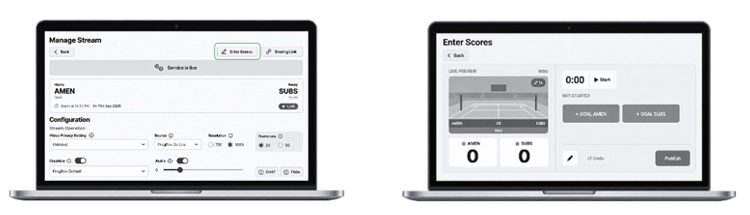
Step 2: Go to Manage Stream and select your match.
Step 3: Click Enter Scores on the top of screen.
Step 4: Use the full scoreboard interface to manage match clocks, add goals/points, and publish live score graphic updates.
NEED HELP?
Submit a FrogBox Support Ticket or please contact our Support team at support@frogbox.com. Please provide your club details so our team can assist you.