
Understanding the new plans
What is changing?
From 1 October 2026, FrogBox is introducing 2 new streaming plans which will be based on your club's streaming usage rather than the number of kits you own. This means your club will have one streaming plan that can be used across multiple kits, with the flexibility to add more streaming hours if needed. These new plans will replace the current annual streaming passes.
Why is FrogBox changing its plans?
The new plans simplify the way your club manages its FrogBox subscription. Rather than paying for multiple streaming passes based on the number of kits you own, your club has a single streaming plan that's based on the hours you stream across one or more FrogBox kits.
What plans are available?
From 1 October 2026, FrogBox will offer two streaming plans to suit different club needs:
The Annual Plan includes 250 streaming hours per annum, with additional hours available for purchase. This is the plan that clubs will transition to as a default.
Alternatively, the Pay As You Go Plan includes 10 streaming hours per annum, with the flexibility to purchase additional hours as you need them. It’s an ideal option for clubs with lighter streaming requirements. Clubs can request to switch to this plan by contacting the FrogBox Support team at support@frogbox.live.
What plan is best for my club?
We recommend the Annual Plan for clubs playing an outdoor cricket season. It includes 250 streaming hours, representing significant value compared to purchasing the same number of hours on Pay As You Go. If your club expects to stream regularly throughout the season, the Annual Plan will typically be the most cost-effective option.
What happens if I stream more than the 250 hours included in my Annual Plan?
If you reach your included 250 streaming hours during your annual subscription, you can simply purchase additional hours at any time.
What is the new Pay As You Go plan?
Pay As You Go is designed for clubs that stream fewer matches each season. Simply purchase the streaming hours you need.
Have FrogBox's Terms & Conditions changed?
Yes. We've updated our Terms & Conditions to support the new streaming plans and reflect the continued evolution of FrogBox. The updates include changes relating to plan renewals, streaming hours and expiry, permitted streaming use, and the treatment of content and data.
View the updated Terms & Conditions: Terms and Conditions
Can I use multiple kits on the same plan?
Yes. Your streaming hours are shared across your club rather than being tied to individual kits. This means you can stream from multiple FrogBox kits using the one club subscription, with all streaming drawing from the same pool of available hours.
I have more than one FrogBox kit. Do I need multiple subscriptions?
No. Under these new plans, your club manages a single streaming plan regardless of how many FrogBox kits you use for streaming. All streaming draws from the same pool of available hours.
How is payment accepted?
Payment can be made by card or bank transfer. You can pay directly through FrogBox Go or follow the payment instructions in your renewal email.
Understanding your club’s transition date
When will these changes affect my club?
Your club will transition to the annual plan when your current streaming pass is due for renewal.
How can I find out my next renewal date?
Log in to FrogBox Go and click Manage Encoders. Find your encoder and you'll see your renewal date displayed in the top-right corner of the encoder card.
If my club has different renewal dates across multiple kits, when will we transition to the new plans?
Your club will be transitioned to the new plan model by us automatically and we’ll reach out to you once complete.
Can I move to the new plans before my renewal?
Yes. If your club prefers to transition earlier than your next renewal date, simply contact our Customer Support team at support@frogbox.live advising which plan you would like to move to and we'll assist you. We'll work with you to ensure any remaining value on your current streaming pass is applied to your new plan.
Will I lose the value of my current subscription if I transition early?
No. If you choose to move to the new plans before your current streaming pass expires, we'll calculate the remaining value of your streaming pass and convert it into streaming hours on your new plan, ensuring you don't lose any prepaid value.
Will I receive a refund if I transition early?
No, we'll convert the remaining value of your streaming pass into streaming hours on your new plan.
I have already renewed this season. Can I still change?
Yes. If you've already renewed but would like to move to the new plans sooner than your next renewal date, get in touch with the Customer Support team at support@frogbox.live.
Understanding streaming hours
What counts towards my streaming hours?
Your streaming hours are calculated based on the length of each stream that has gone live. Live streams generally start 10 minutes before the scheduled start time and finish when you click Stop stream. We recommend clubs stop their stream via FrogBox Go at the end of a live stream to save on hours.
How can I monitor my club's streaming usage throughout the season?
On your FrogBox Go account you will see the amount of hours used and remaining at the bottom of the homepage.
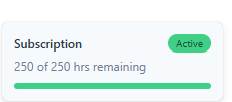
What happens if I use all of my Annual Plan hours?
You can continue streaming beyond the 250 hours included in your annual plan by purchasing additional hours whenever you need them.
Can I purchase additional streaming hours before I run out?
Yes. Additional streaming hours can be purchased at any time, so you don't need to wait until you've used all of your included hours before topping up.
How can I purchase additional streaming hours when I need them?
Currently, you can contact support at support@frogbox.live to request to purchase top up hours. There will be a self service option made available soon to purchase hours via FrogBox Go.
What happens if I purchase additional streaming hours but don't use them all?
Any unused streaming hours expire when your plan reaches its next renewal date. We recommend only purchasing additional hours to cover your needs until your next renewal date, as unused hours will not carry over into your next plan period.
Do blue screens, “Vision unavailable” messages and/or rain delays count towards my streaming hours?
Yes. Streaming hours are based on the length of time a stream is running, regardless of whether the video is being successfully captured for live play or not.
This means that if your stream experiences a blue screen, “Vision unavailable” message, or similar interruption, the time will still count towards your streaming hours while the stream remains active.
If you think you won’t be able to resolve the issue, we recommend stopping your stream via FrogBox Go to avoid using additional streaming hours unnecessarily.
Understanding plans when streaming across multiple FrogBox Go accounts
Some of our streams are managed through a different FrogBox Go account. Do we need to purchase a second streaming plan?
Not necessarily. We understand that some leagues, representative teams and clubs stream matches across multiple FrogBox Go accounts due to their competition structure or shared operations.
If your organisation regularly streams across more than one FrogBox Go account but you'd like to manage everything under a single streaming plan, please contact the FrogBox Support team at support@frogbox.live. We'll work with you to determine the best approach and, where appropriate, transfer streaming hours between your connected accounts.
Our league streams representative or carnival matches from a separate FrogBox Go account. How does this work?
If your representative or carnival matches are streamed through a separate FrogBox Go account, we can work with you to ensure those streams are covered without requiring an additional Annual Plan where appropriate.
Please contact the FrogBox Support team before your season begins so we can review your account structure and ensure your streaming hours are allocated correctly.
Can streaming hours be shared between different FrogBox Go accounts?
In some circumstances, yes. Where multiple FrogBox Go accounts are operated by the same organisation or are closely connected (for example, a league and its representative team), FrogBox may be able to manually allocate streaming hours between those accounts.
If this applies to your organisation, please get in touch with the FrogBox Support team so we can discuss your setup.
We have a league account and several club accounts. How do the new plans work?
Each FrogBox Go account normally manages its own streaming plan. However, we recognise that some organisations operate across multiple connected accounts. If your current setup means streaming is shared between those accounts, contact our Support team and we'll work with you to find the most suitable solution.
Will I have to pay twice if I stream under two FrogBox Go accounts?
Not necessarily. If your organisation streams under multiple connected FrogBox Go accounts, please contact us before purchasing another plan. We'll review your account structure and advise whether your streaming hours can be managed across those accounts.
Who should contact FrogBox if this applies to us?
The administrator of your primary FrogBox Go account should contact the FrogBox Support team at support@frogbox.live. We'll review your organisation's account structure and advise the best way to manage your streaming plans and streaming hours.