
Fully charge your kit before each game. Best practice is to charge your camera and encoder immediately after streaming. A full charge takes around 4 hours and provides up to 12 hours of battery life.
CHARGE YOUR ENCODER
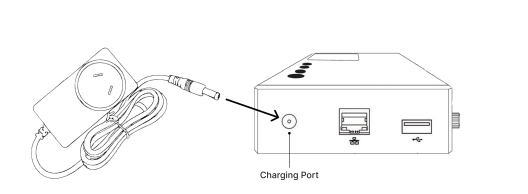
Step 1: Plug the encoder power adaptor into the encoder
Step 2: Plug into a wall socket to start charging. The encoder will charge whilst switched off
Step 3: To monitor battery levels, turn on the encoder (press the power button for 5 seconds). Wait until the preview screen lights up
Step 4: Charge until the battery symbol shows over 95% (approx. 2 hours)
Step 5: You can monitor battery levels as follows:
| Battery Symbol (on encoder screen) | Battery Life |
| 1%* | 0 - 4 hours |
| 2-25% | 4 - 6 hours |
| 26-50% | 6 - 8 hours |
| 51-75% | 8 - 10 hours |
| 76-100% | 10 - 12 hours |
*The encoder battery percentage currently has an issue on low % displays and will show 1% even when there is still 4 hours of battery life left.
CHARGE YOUR CAMERA
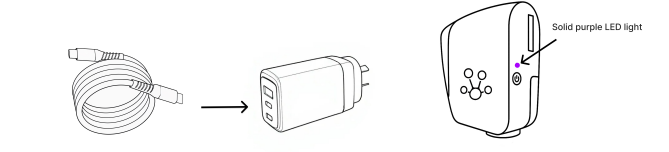
Step 1: Plug the USB-C cable into the multi-port power adaptor
Step 2: Plug the adaptor into a wall socket to charge the camera. The camera will charge whilst switched off
Step 3: To monitor battery levels, turn on the camera (press the black button until solid white light) and watch for a solid purple light indicating a battery level of 97-100%.
Step 4: You can monitor battery levels as follows:
| Battery Level | Light Indicators (whilst camera is charging) | Battery Life |
| 0-25% | Fast purple blink | 0 - 3 hours |
| 26-50% | Slow purple blink | 3 - 6 hours |
| 51-75% | Breathing purple | 6 - 11.5 hours |
| 97-100% | Solid purple | 11.5 - 12 hours |
For more information on V2 batteries, please refer to this article: Understanding V2 Batteries