
Want to practise before your first live stream?
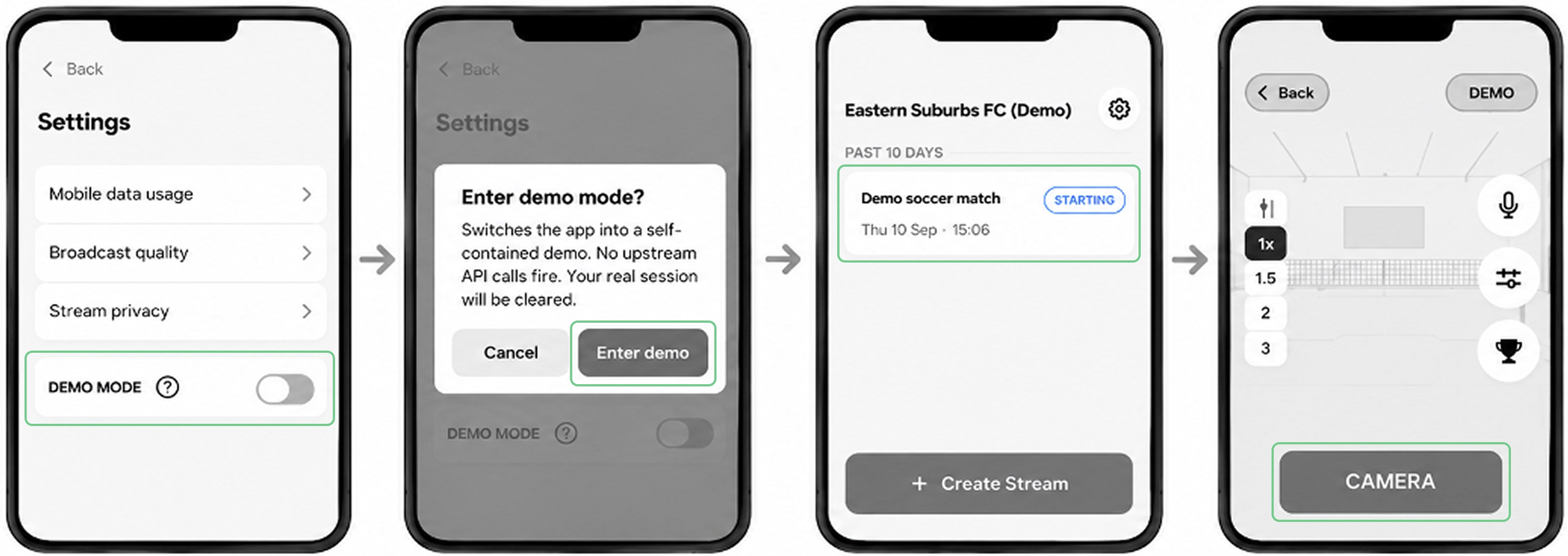
Demo Mode lets you experience the FrogBox Go Lite streaming workflow without broadcasting a live match. Demo Mode simulates a live stream without broadcasting. It provides a generic FrogBox demo live stream experience with all sports and features available. Your standard experience may differ depending on your sport and competition integration, with some features unavailable.
To try Demo Mode:
Step 1: Open FrogBox Go Lite and tap the Settings ⚙️ icon.
Step 2: Toggle on Demo Mode.
Step 3: Tap Enter Demo Mode.
Step 4: Tap the pre-configured demo match.
Step 5: Tap Camera to see the demo live stream.
Step 6. Tap GO to practise the streaming experience.
Important: Demo Mode simulates a live stream and does not broadcast to YouTube, so it can be used to practise before your first live match.
NEXT STEPS: Start scheduling your matches and go live with FrogBox Go Lite.
NEED HELP?
Submit a FrogBox Support Ticket or please contact our Support team at support@frogbox.com. Please provide your club details so our team can assist you.